Phase correction is a crucial frequency-domain operation applied after the Fourier Transform. Due to hardware delays, filter group delays, and off-resonance effects, the real part of the resulting complex spectrum often contains a mixture of absorptive and dispersive lineshapes, rather than pure absorptive peaks.
A phase correction applies a frequency-dependent phase angle, , to the spectrum:
Where the phase angle is modeled as a linear polynomial consisting of a zero-order
(frequency-independent) term and a first-order (frequency-dependent) term .
To ensure the first-order twist scales predictably regardless of the spectral sweep width, is anchored around a physical pivot coordinate (by default, the point of maximum magnitude) and scaled by the absolute spectral range:
import matplotlib.pyplot as plt
import numpy as np
import xarray as xr

# Ensure the accessor is registered
import xmris
1. Generating Synthetic Unphased Data
Let’s generate a synthetic, noisy Free Induction Decay (FID) with two distinct peaks, convert it to a spectrum, and then intentionally apply severe zero- and first-order phase errors to simulate raw scanner data.
Source
# Acquisition parameters
dwell_time = 0.001  # 1 ms
n_points = 1024
t = np.arange(n_points) * dwell_time

# Synthetic FID: Two peaks at 50 Hz and -150 Hz
rng = np.random.default_rng(42)
clean_fid = np.exp(-t / 0.05) * (
    np.exp(1j * 2 * np.pi * 50 * t) + 0.6 * np.exp(1j * 2 * np.pi * -150 * t)
)
noise = rng.normal(scale=0.08, size=n_points) + 1j * rng.normal(scale=0.08, size=n_points)
raw_fid = clean_fid + noise

# Xarray construction and FFT
da_fid = xr.DataArray(
    raw_fid, dims=["time"], coords={"time": t}, attrs={"sequence": "sLASER", "B0": 7.0}
)
da_spec = da_fid.xmr.to_spectrum()

# Intentionally ruin the phase: p0 = 120 degrees, p1 = -45 degrees
# The pivot defaults to the peak with the maximum magnitude (50 Hz)
da_ruined = da_spec.xmr.phase(p0=120.0, p1=-45.0)

fig, axes = plt.subplots(1, 2, figsize=(12, 3))
da_spec.real.plot(ax=axes[0], color="tab:blue")
axes[0].set_title("Target 'Clean' Spectrum (Real Part)")

da_ruined.real.plot(ax=axes[1], color="tab:red")
axes[1].set_title("Unphased Spectrum (Real Part)")
plt.tight_layout()
plt.show()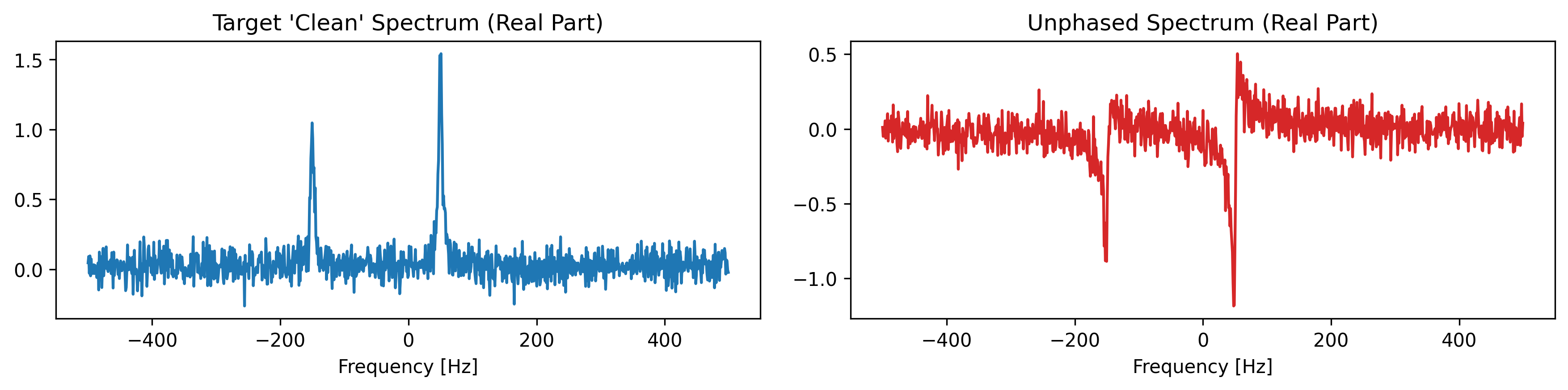
2. Manual Phase Correction
We can manually apply zero- and first-order phase correction (in degrees) using the .xmr.phase() method.
Because this is an xarray accessor, the exact quantifiable phase angles used are permanently appended to the
DataArray attributes (as phase_p0, phase_p1, and phase_pivot) to safely preserve the data lineage.
Since we know we ruined the spectrum with and , we can restore it
by applying the exact inverse. Because phase corrections do not alter the absolute magnitude of the spectrum, the default calculated pivot remains perfectly symmetric!
# Apply the inverse phase angles and specify the dimension
da_manual = da_ruined.xmr.phase(dim="frequency", p0=-120.0, p1=45.0)

fig, ax = plt.subplots(figsize=(8, 3))
da_ruined.real.plot(ax=ax, color="lightgray", label="Unphased")
da_manual.real.plot(ax=ax, color="tab:blue", label="Manually Phased")
plt.legend()
plt.title("Manual Phase Correction")
plt.show()

# Print the attributes to see the strictly tracked mathematical lineage
print("Stored Phase Attributes:")
print(f"  phase_p0: {da_manual.attrs.get('phase_p0')}")
print(f"  phase_p1: {da_manual.attrs.get('phase_p1')}")
print(f"  phase_pivot: {da_manual.attrs.get('phase_pivot')}")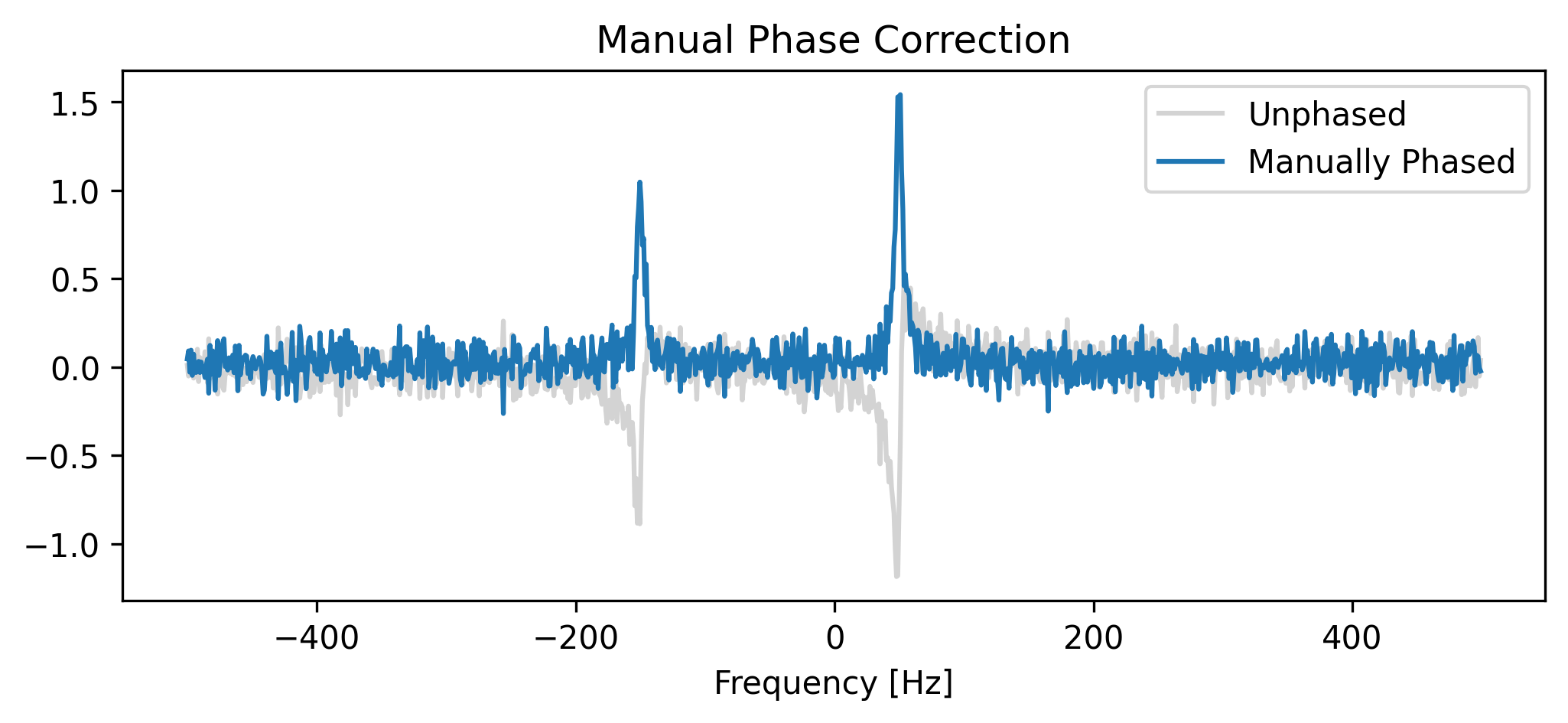
Stored Phase Attributes:
  phase_p0: -120.0
  phase_p1: 45.0
  phase_pivot: 48.828125
🧬 Metadata Lineage: Phase Attributes
When you apply phase correction, xmris appends the following attributes to the DataArray. This ensures that any downstream analysis or automated pipeline knows exactly how the complex signal was rotated.
| Attribute | Unit | Description |
|---|---|---|
phase_p0 | degrees | Zero-order phase. A constant phase shift applied uniformly to all points. |
phase_p1 | degrees | First-order phase. The total phase “twist” accumulated across the entire spectral range. |
phase_pivot | (varies) | Pivot point. The coordinate value where the first-order phase contribution is exactly zero. |
phase_pivot_coord | string | Coordinate context. The name of the dimension (e.g., frequency or chemical_shift) the pivot belongs to. |
Mathematical Note: The phase angle at any coordinate is calculated as:
Next up: Automated Phase Correction (autophase)
Finding the perfect phase angles manually is tedious. We can use algorithms such as entropy-minimization algorithm (ACME) to find the global phase minimum automatically.